
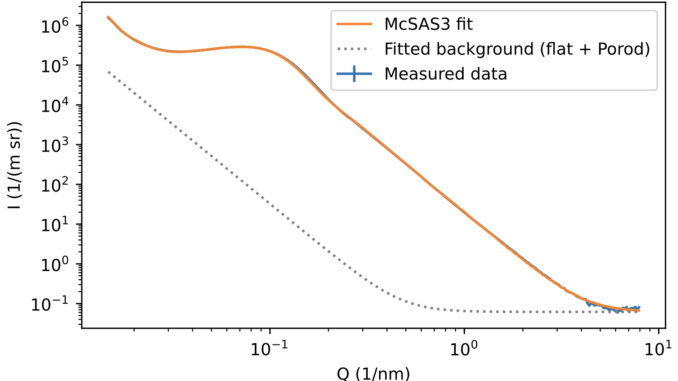
I’ve been fixing some minor usability bugs and requests in McSAS3+GUI over the last weeks, and that has led to some dramatic improvements.
Firstly, due to a change in the internal optimiser, the optimisation itself is now up to 15x faster for simple models, making it easier to process large batches of (operando/in-situ) data. This isn’t easy to visualise for show&tell here, but would be noticeable to any user familiar with the old speed. This speed increase makes it more feasible to include McSAS3 in a live data pipeline.
Secondly, you can now add a Porod-slope background in addition to the standard flat background to the McSAS3 fit, making it easier to use for practical samples containing large scatterers (e.g. powders). Backgrounds are now added to the data visualisation allowing for easier assessment of impact. The Porod background is optional and can be set to “true” or “false” (default). The flat background is now also optional, and can be set to “true” (default), “positive”, or “false”.
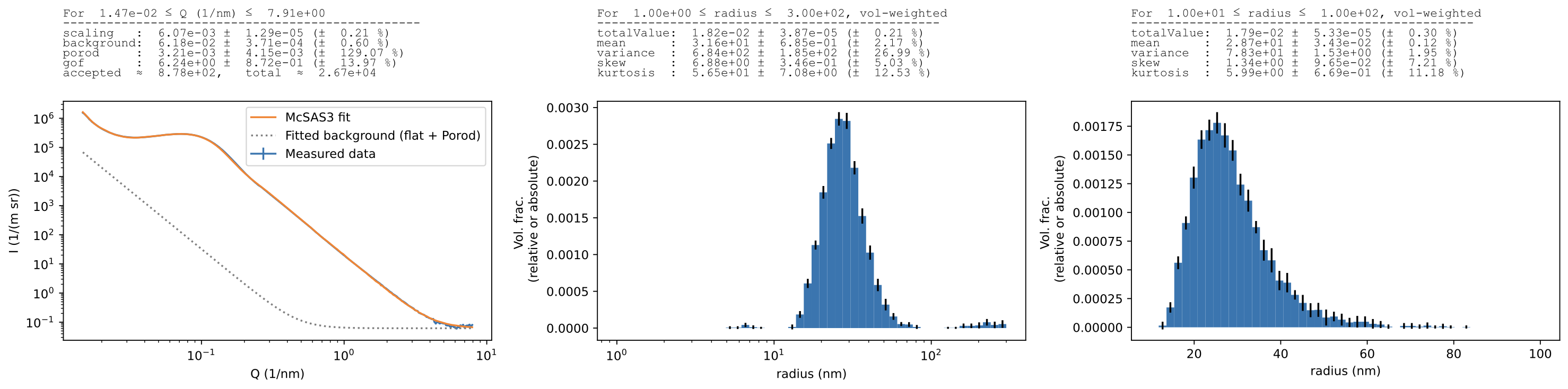
At the same time, a couple of usability improvements have been made that should not be visible except that it makes the UI and backend behaviour a bit smoother. One of the biggest changes is that re-histogramming now also replaces the original information in the file (as it always should have), one of the smallest changes is that loading a configuration file will now also automatically replace the relevant configuration setting in the batch optimization and -histogramming tabs.
McSAS3GUI can be downloaded from here: https://github.com/BAMresearch/McSAS3GUI and can be run either as an experimental binary, or from a python 3.12+ environment. By far the easiest way, however, to install and immediately launch it is using Astral’s “uv”:
uvx --python 3.14 --from mcsas3gui m3gui
The first run may take a few minutes. uvx creates an isolated Python environment, installs McSAS3GUI and McSAS3, and then starts the m3gui application. You do not need to create or activate a virtual environment.
Have fun with it, and let me know if it has been useful or not. Bug reports and feature requests can be made on the GitHub page.